8 Best PDF Translators in 2026
Translating the words in a PDF is easy. Producing a translated PDF that you can comfortably read, review, and share is much harder.
A general translation tool may extract the text but scramble the reading order. Tables can lose their structure. Longer translated sentences may overlap nearby content. Scanned pages introduce another problem because the translator needs OCR before it can translate anything at all.
We compared eight popular options based on the parts of PDF translation that affect everyday use: formatting, speed, local or cloud processing, editing, and price. Our top choice for Apple users is Doco Translate. It preserves the PDF layout, supports scanned documents, lets you edit the translation, and starts showing translated pages before the rest of the file is finished.
That does not make it the right tool for everyone. DeepL is a strong choice for European language pairs, Adobe Acrobat suits teams that already depend on Adobe's PDF tools, and PDFMathTranslate is worth considering if you are comfortable running open-source software yourself.
Best PDF translators at a glance
| Tool | Best for | Formatting | Speed | File processing | Editing | Price |
|---|---|---|---|---|---|---|
| Doco Translate | Top choice for Apple users | ⭐⭐⭐⭐⭐ | ⭐⭐⭐⭐⭐ | Local | ✓ | Low |
| DeepL | Raw text translation quality (EU pairs) | ⭐⭐⭐ | ⭐⭐⭐⭐ | Upload | Limited | Medium |
| Google Translate | General-purpose text translation | ⭐⭐ | ⭐⭐⭐⭐ | Upload | ✕ | Free |
| DocTranslator | Keeping complex PDF layouts intact | ⭐⭐⭐⭐ | ⭐⭐⭐ | Upload | ✕ | Medium |
| Microsoft Translator | Enterprise Microsoft 365 users | ⭐⭐⭐⭐ | ⭐⭐⭐ | Upload | ✕ | Usage-based |
| Adobe Acrobat | Enterprise PDF workflows | ⭐⭐⭐⭐⭐ | ⭐⭐⭐ | Upload | ✓ | High |
| PDFMathTranslate | Tech-savvy academics (self-hosted) | ⭐⭐⭐⭐⭐ | ⭐⭐ | Local | Limited | Free* |
| ChatGPT | AI workflow integration | ⭐ | ⭐ | Upload | Manual | Token-based |
PDFMathTranslate is open source, but the translation engine or API you connect may cost money.
Speed in this table reflects how quickly you can begin using the translation, not only how long the server takes to process a file. Doco Translate works page by page, so you can start reading while it continues translating. Most upload-based tools return the document after the entire job is complete.
1. Doco Translate: best PDF translator for Apple
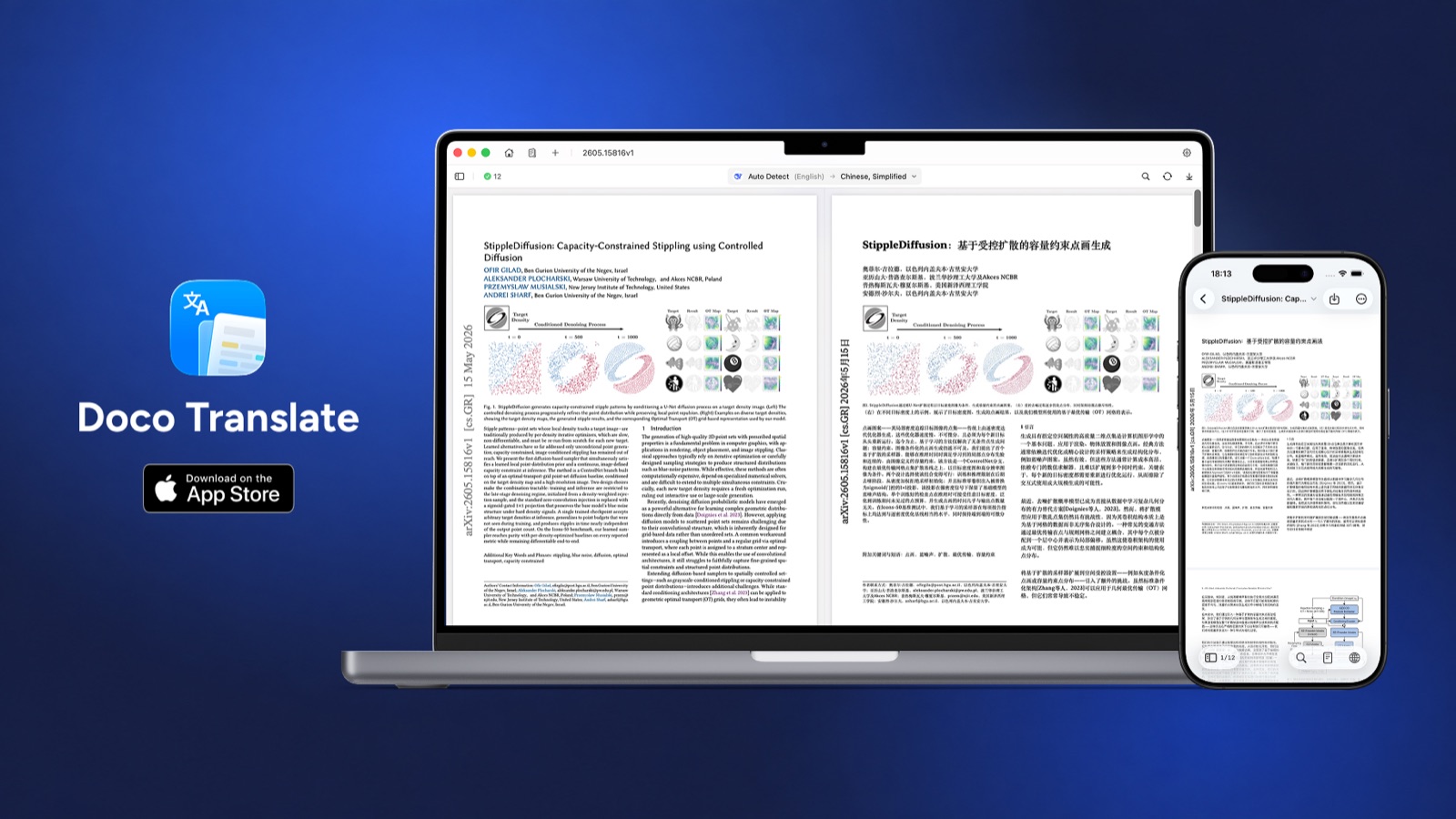
Doco Translate is a native PDF translator for macOS and iOS. Unlike a website that asks you to upload a document and wait for a new file, Doco parses the PDF on your device and displays the original and translation together.
Its main advantage is the workflow. Open a document, choose the target language and translation service, then begin reading as pages are translated. The original stays on the left and the translated page appears on the right. Scrolling and zooming remain synchronized, and corresponding paragraphs are highlighted when you point to them.
That page-by-page approach matters on long reports and books. You do not have to stare at a progress screen until page 200 is finished. The first translated pages are available while Doco continues working in the background.
Doco also handles the PDF-specific work that general AI tools leave to the user:
- It preserves paragraphs, tables, images, formulas, and multi-column layouts.
- Built-in OCR extracts text from scanned and image-based PDFs.
- You can edit translated paragraphs inside the app.
- Results can be exported as translated or bilingual PDF, image, Markdown, or plain text files.
- A reflow view turns fixed PDF pages into a more comfortable reading layout.
The document itself is parsed locally. If you choose Google Translate, Microsoft Translator, or a cloud AI provider, the text needed for translation is sent to that provider under its own privacy policy. For a fully local workflow, Doco can connect to Apple Translate or local models running through Ollama, LM Studio, or oMLX. This distinction is important. "Local PDF processing" and "local translation" are not always the same thing, and Doco gives you control over both.
You can download Doco Translate free from the Mac App Store. The free plan covers the core reading and translation experience. Pro adds unlimited PDF translation and export features at a much lower price than most full PDF suites.
The main limitation is platform support. Doco requires macOS 15 or later or iOS 18 or later. Windows and Android users will need another option on this list.
Best for: Mac and iPhone users who regularly translate PDFs and care about formatting, privacy, scanned documents, and bilingual review.
2. DeepL: better raw translation quality
DeepL has earned a strong reputation for natural output, especially across European language pairs. Its file translator accepts PDFs and tries to retain the original formatting, images, fonts, headings, captions, and footnotes.
For straightforward digital PDFs, the workflow is easy: upload the file, select a language, wait for processing, and download the result. Glossaries and formality controls are useful for business documents that repeat the same terminology.
PDF formatting is less predictable than the raw text quality. DeepL notes that differences in word length can cause layout shifts. Its own documentation also says that images embedded inside PDFs are not translated as part of the document upload. Those images need to be translated separately and placed back into the file. See DeepL's file translation guide and image translation limitations.
Editing is available, but the experience depends on the plan. Some paid plans can convert a translated PDF to DOCX, while segment-level review and collaboration belong to higher-tier business workflows. DeepL is therefore strongest when you want good language output and do not need a live bilingual PDF reader.
Best for: Users who put translation quality first, particularly for European languages and relatively simple document layouts.
3. Google Translate: free option for simple PDFs
Google Translate remains the easiest option for a quick, free document translation. There is no software to install, and the document translator can return a downloadable translated file.
The limits become clear once the PDF is scanned or visually complex. Google accepts documents up to 10 MB, and PDFs can contain no more than 300 pages. Its official help page states that text found in images and scanned PDF pages is not translated. Document translation is also unavailable on smaller screens and mobile devices. These limits are documented in Google Translate Help.
Google Translate is fine for a short report with a single-column layout. It is a weaker fit for research papers, brochures, manuals, scanned contracts, and documents that need review before sharing. There is no built-in bilingual editor, and the file must be uploaded.
Best for: Occasional translations where cost and convenience matter more than formatting or editing.
4. DocTranslator: browser-based option for complex layouts
DocTranslator focuses on turning an uploaded document into a translated file while keeping the visual structure intact. It supports PDFs as well as Word, PowerPoint, spreadsheets, images, and several publishing formats.
Its formatting results are usually better than pasting extracted text into a general translation box. Images and columns tend to remain in their original positions, which makes DocTranslator useful for brochures, reports, and other visually arranged files.
The tradeoff is control. The document is uploaded to a cloud service, translation quality depends on the underlying engine, and the workflow is mostly upload, wait, and download. OCR support and post-translation editing are not as central to the experience as they are in a dedicated desktop PDF translator.
DocTranslator is also less attractive for regular use than its first upload may suggest. The service uses a trial and subscription model with page or word allowances. Current details are available on the DocTranslator pricing page.
Best for: Users who want a browser tool and place more value on layout retention than local processing or detailed review.
5. Microsoft Translator: choice of enterprise automation
The relevant Microsoft product for full PDFs is Azure AI Translator's Document Translation service, not simply the consumer Translator app.
Azure Document Translation can preserve document structure, process large batches, use custom glossaries, and connect to custom translation models. Microsoft's 2026 API also supports PDF translation through Azure Document Intelligence, including scanned content and layout reconstruction.
It is powerful, but it is not designed as a simple personal PDF reader. Batch translation can require an Azure Translator resource, authentication, Blob Storage containers, and API integration. Microsoft charges according to the amount of text or image content processed. The Azure Document Translation documentation explains the available batch and synchronous workflows.
For a company translating thousands of documents inside an existing Microsoft environment, that complexity may be reasonable. For someone who wants to open one foreign-language PDF on a Mac, it is unnecessary overhead.
Best for: Enterprises and developers building document translation into Microsoft or Azure workflows.
6. Adobe Acrobat: all-in-one PDF suite
Adobe Acrobat has an obvious advantage: it already knows how to work with PDFs. Its tools cover OCR, editing, conversion, signatures, forms, and document management. Translation is available through Acrobat AI Assistant and Adobe Express.
The formatting potential is strong because the PDF remains inside Adobe's ecosystem. Scanned documents can go through Acrobat OCR, and users can edit the result with familiar PDF tools. Existing Acrobat customers may prefer this to adding another application.
The workflow is heavier than a dedicated translator. Depending on the route you choose, you may open the PDF in Acrobat, invoke AI Assistant, move the document into Adobe Express, review the translated pages, then download a new PDF. Adobe describes both approaches in its PDF translation guide.
Price is the other drawback. Acrobat makes sense when your team also needs its editing, signing, and compliance features. Paying for the suite only to translate PDFs is harder to justify.
Best for: Businesses already using Acrobat for wider PDF workflows.
7. PDFMathTranslate: open-source option for academic PDFs
PDFMathTranslate is built for scientific papers. It pays particular attention to formulas, charts, annotations, tables of contents, and bilingual output. It can connect to Google, DeepL, OpenAI, Ollama, and other translation services.
The project is open source and can run locally. That makes it appealing to researchers who want control over their files or already use local language models. It also provides several ways to run the software, including a command-line tool, web interface, Docker container, and Zotero integration. The setup options are listed in the PDFMathTranslate documentation.
Those options are also its weakness. Installing Python packages, downloading layout models, running Docker, or configuring API keys is more work than installing a normal Mac app. Translation usually completes as a document-generation job rather than an interactive page-by-page reading session. You can create bilingual output, but inline correction is limited.
Best for: Technical users and academics who translate formula-heavy papers and do not mind configuring their own tools.
8. ChatGPT: AI-assisted translation tasks
ChatGPT is useful when translation is part of a larger task. You can upload a paper, translate selected sections, ask for an explanation of difficult terminology, change the tone, or compare several possible translations. That flexibility is difficult for a conventional machine translation service to match.
It is not a layout-preserving PDF translator. ChatGPT can work with uploaded documents, but its normal output is a conversation, not a finished translated PDF that mirrors the source. Rebuilding the layout requires a separate workflow.
There are also plan-dependent differences in how ChatGPT reads PDFs. OpenAI's file upload documentation says that non-Enterprise plans use text-based retrieval for documents and discard embedded images. Visual retrieval for charts and images inside PDFs is limited to ChatGPT Enterprise, according to the Visual Retrieval FAQ.
ChatGPT is a good companion for translation and analysis. It is a poor replacement for software designed to preserve every page, table, and image.
Best for: Translating selected passages, explaining content, and connecting translation to a broader AI workflow.
What to look for in a PDF translator
The best choice depends on what kind of PDF you have and what you plan to do with the result.
Formatting preservation
PDFs store content at fixed positions on a page. A translator needs to understand text blocks, reading order, tables, images, and the space available for longer translated sentences. A tool that performs well on plain text may still fail on a two-column paper or a financial table.
Choose a PDF-specific tool when the translated file needs to remain readable or shareable. Doco Translate, Adobe Acrobat, DocTranslator, and PDFMathTranslate approach the file as a visual document rather than a container of text.
Scanned PDF support
A scanned PDF contains page images instead of selectable text. It needs OCR before translation. Google Translate does not translate scanned text in its document workflow, while Doco Translate and Adobe Acrobat include OCR. Microsoft supports scanned PDFs through its Azure document services. PDFMathTranslate support depends on the version and processing setup.
Clear scans produce better results. Low resolution, skewed pages, handwriting, stamps, and watermarks can cause errors before the translation engine ever sees the text.
Privacy and file processing
Cloud translators require you to send the file or its contents to a remote service. That may be acceptable for a public paper and unsuitable for a contract, medical record, unpublished manuscript, or internal report.
Doco Translate parses the PDF on the device. Pairing it with Apple Translate or a local model keeps translation local as well. PDFMathTranslate can also run in a self-hosted environment, although it takes more work to set up.
Reading and editing
A downloadable translated file is useful, but it does not make checking the translation easy. Side-by-side reading shows the original context and makes mistakes easier to spot. Editing matters when names, technical terms, or product language need correction.
Doco Translate combines bilingual reading and direct editing in the same window. Adobe provides broader PDF editing tools. DeepL's editing features vary by plan. Google Translate, Microsoft Document Translation, and DocTranslator are mainly file-conversion workflows.
Which PDF translator should you choose?
Use Doco Translate if you have a Mac or iPhone and want the best balance of layout preservation, speed, privacy, OCR, and editing.
Use DeepL when raw translation quality is your main concern and the PDF has a simple digital layout.
Use Google Translate for a quick, free translation of a short, text-based document.
Use DocTranslator when you want a browser-based tool that makes a serious attempt to retain the original design.
Use Microsoft Translator for high-volume translation inside an enterprise application or Microsoft cloud environment.
Use Adobe Acrobat if your organization already pays for Acrobat and needs translation alongside OCR, editing, signatures, and other PDF tools.
Use PDFMathTranslate if you are comfortable with open-source software and mainly translate scientific papers.
Use ChatGPT when you need to translate, explain, summarize, or rewrite selected content rather than produce a finished translated PDF.
Frequently asked questions
What is the best PDF translator in 2026?
Doco Translate is our top choice for Mac and iPhone users because it combines layout preservation, page-by-page translation, built-in OCR, bilingual reading, editing, and local PDF processing. DeepL is a strong alternative when raw text translation quality matters more than the PDF workflow.
What is the best free PDF translator?
Google Translate is the simplest fully free option for basic digital PDFs. Doco Translate has a free plan with a more complete PDF reading experience. PDFMathTranslate is open source, but you may need to supply a paid API or run a local model.
Can I translate a PDF without losing its formatting?
Yes, but the result depends on the document. Doco Translate, Adobe Acrobat, DocTranslator, and PDFMathTranslate are designed to retain page structure. Complex tables, unusual fonts, low-quality scans, and large differences in sentence length can still affect the output in any tool.
Can Google Translate translate a scanned PDF?
No. Google's document translation help states that text in images and scanned PDF pages is not translated. Use a translator with built-in OCR, such as Doco Translate or Adobe Acrobat.
Can ChatGPT translate an entire PDF and keep the layout?
ChatGPT can translate extracted content, but it does not reliably return a finished PDF with the original page design intact. It is better for translating or explaining selected passages than for layout-preserving document production.
What is the most private PDF translator?
Doco Translate is a strong choice for Apple users because it parses documents locally and can connect to fully local translation engines. PDFMathTranslate can also be self-hosted. Any cloud translation service requires you to review the provider's privacy terms before uploading sensitive material.
What is the best PDF translator for Mac?
Doco Translate is built specifically for macOS and supports layout preservation, scanned PDFs, bilingual reading, direct editing, and multiple translation engines. It also begins showing translated pages while the rest of the document continues processing.
Final verdict
For most Apple users, Doco Translate is the most practical PDF translator in this comparison. It does more than send extracted text to a translation engine. It keeps the document readable, lets you compare and correct the result, and removes the wait before you can start reading a long file.
DeepL remains a good choice for language quality, Adobe Acrobat for established enterprise PDF workflows, and PDFMathTranslate for technical users who want an open-source setup. If your daily work involves foreign-language PDFs on a Mac or iPhone, Doco Translate offers the best overall combination of speed, privacy, formatting, and control.
Inizia a tradurre gratuitamente
Scarica Doco Translate e inizia subito il tuo viaggio nella traduzione di documenti.